<?xml version="1.0" encoding="UTF-8"?><feed
	xmlns="http://www.w3.org/2005/Atom"
	xmlns:thr="http://purl.org/syndication/thread/1.0"
	xml:lang="ja"
	xml:base="https://postgresweb.com/wp-atom.php"
	>
	<title type="text">PostgresWeb &#8211; ポスグレウェブ</title>
	<subtitle type="text"></subtitle>

	<updated>2024-02-02T12:54:25Z</updated>

	<link rel="alternate" type="text/html" href="https://postgresweb.com" />
	<id>https://postgresweb.com/feed/atom</id>
	<link rel="self" type="application/atom+xml" href="https://postgresweb.com/feed/atom" />

	<generator uri="https://wordpress.org/" version="5.8.13">WordPress</generator>
<icon>https://postgresweb.com/wp-content/uploads/2021/07/cropped-postgresweb_siteicon2-32x32.jpg</icon>
	<entry>
		<author>
			<name>tatsuki</name>
					</author>

		<title type="html"><![CDATA[【Udemyレビュー】ゼロから分かるコンピュータの仕組み]]></title>
		<link rel="alternate" type="text/html" href="https://postgresweb.com/how-computers-work-from-zero" />

		<id>https://postgresweb.com/?p=15035</id>
		<updated>2024-02-02T12:53:40Z</updated>
		<published>2024-02-02T12:39:55Z</published>
		<category scheme="https://postgresweb.com" term="Ubuntu" />
		<summary type="html"><![CDATA[<p>当サイトは、アフィリエイト広告を利用しています &#160; レビューする講座 今回レビューする講座はこちら &#160; コンピュータの仕組みをゼロから理解するが特徴の講座です。 &#160; &#160; [ball [&#8230;]</p>
<p>The post <a href="https://postgresweb.com/how-computers-work-from-zero">【Udemyレビュー】ゼロから分かるコンピュータの仕組み</a> first appeared on <a href="https://postgresweb.com">PostgresWeb - ポスグレウェブ</a>.</p>]]></summary>

					<content type="html" xml:base="https://postgresweb.com/how-computers-work-from-zero"><![CDATA[<p style="text-align: right;"><span style="font-size: 14px; color: #808080;">当サイトは、アフィリエイト広告を利用しています</span></p>
<p>&nbsp;</p>
<h2>レビューする講座</h2>
<p style="margin: -15px 0px 0px 0px; line-height: 34px;"><span style="font-size: 15px;">今回レビューする講座はこちら</span></p>
<p><a href="https://click.linksynergy.com/deeplink?id=FyKC2e4V2/g&amp;mid=47984&amp;murl=https%3A%2F%2Fwww.udemy.com%2Fcourse%2Ftobach_02%2F" target="_blank" rel="noopener"><img loading="lazy" class="alignnone wp-image-15037 size-full" src="https://postgresweb.com/wp-content/uploads/2024/02/udemy_review04.png" alt="" width="885" height="198" srcset="https://postgresweb.com/wp-content/uploads/2024/02/udemy_review04.png 885w, https://postgresweb.com/wp-content/uploads/2024/02/udemy_review04-300x67.png 300w, https://postgresweb.com/wp-content/uploads/2024/02/udemy_review04-768x172.png 768w, https://postgresweb.com/wp-content/uploads/2024/02/udemy_review04-530x119.png 530w, https://postgresweb.com/wp-content/uploads/2024/02/udemy_review04-565x126.png 565w, https://postgresweb.com/wp-content/uploads/2024/02/udemy_review04-710x159.png 710w, https://postgresweb.com/wp-content/uploads/2024/02/udemy_review04-725x162.png 725w" sizes="(max-width: 885px) 100vw, 885px" /></a></p>
<p>&nbsp;</p>
<p style="margin: 0px; line-height: 34px;"><span style="font-size: 15px;"><strong>コンピュータの仕組みをゼロから理解する</strong>が特徴の講座です。</span></p>
<p>&nbsp;</p>
<p>&nbsp;</p>
<p style="margin: 0px; line-height: 34px;">[balloon_left img="https://postgresweb.com/wp-content/uploads/2023/10/profile1.png" caption=""]<span style="font-size: 14px;">私の会社ではUdemy Businessに入っているため自腹なし＋見放題。<br />
大量の講座を見ている私（SE歴15年）がこの講座の感想を正直に伝えます。<br />
※あくまで個人的な感想です</span>[/balloon_left]</p>
<p>&nbsp;</p>
<p>&nbsp;</p>
<h2>評価：★★☆☆☆</h2>
<p style="margin: -15px 0px 0px 0px; line-height: 34px;"><span style="font-size: 15px;">私の評価は星２つ（最大５つ中）です。</span></p>
<p>&nbsp;</p>
<p style="margin: 0px 0px 0px 0px; line-height: 34px;"><span style="font-size: 15px;">人によってかなり評価が分かれると思った講座でした。</span></p>
<p>&nbsp;</p>
<p style="margin: 0px 0px 0px 0px; line-height: 34px;"><span style="font-size: 15px;">私はこの講義を「コンピュータとは？」という学校の授業のように感じました。</span><span style="font-size: 15px;">楽しくはないけど覚えておいて損はないという内容です。</span></p>
<p>&nbsp;</p>
<p style="margin: 0px 0px 0px 0px; line-height: 34px;"><span style="font-size: 15px;">講義では２進数や回路の話など、工学系（？）の話も多いため脱落してしまう人も多いと思います。特に最初の2進数のところはマジでつまらなかったのでSKIP推奨です。</span></p>
<p>&nbsp;</p>
<p style="margin: 0px 0px 0px 0px; line-height: 34px;"><span style="font-size: 15px;">「知っておいた方がいい内容」であることは否定しないですが、この講義の内容を知っていなくてもSEの業務は全然できてしまうので、「SEを目指す人向け」というよりは「すでに業務で活躍していてハード面の知識を拡充したい人向け」だと思います。</span></p>
<p>&nbsp;</p>
<p style="margin: -15px 0px 0px 0px; line-height: 34px;"><span style="font-size: 15px;">SEの仕事はハード面の知識は弱くなりがちなので、この動画をみることで「どういう原理かわからなかったこと」や、「疑問に思っていたこと」が解決できたり、考え方の助けになると思います。</span></p>
<p>&nbsp;</p>
<p>&nbsp;</p>
<h2>プレビューがありましたので参考に</h2>
<p style="margin: -15px 0px 0px 0px; line-height: 34px;"><span style="font-size: 15px;"><span style="background: linear-gradient(transparent 60%, yellow 0%);">この講義はプレビューが複数見れる</span>ので、購入を考えている人はその前に見ることをおすすめします。</span></p>
<p>&nbsp;</p>
<p><span style="font-size: 15px;"><a href="https://click.linksynergy.com/deeplink?id=FyKC2e4V2/g&amp;mid=47984&amp;murl=https%3A%2F%2Fwww.udemy.com%2Fcourse%2Ftobach_02%2F" target="_blank" rel="noopener"><strong>≫ ゼロから分かるコンピュータの仕組み【ハードとソフトの動きをイメージできるようになろう！】 ≪</strong></a></span></p>
<p>&nbsp;</p><p>The post <a href="https://postgresweb.com/how-computers-work-from-zero">【Udemyレビュー】ゼロから分かるコンピュータの仕組み</a> first appeared on <a href="https://postgresweb.com">PostgresWeb - ポスグレウェブ</a>.</p>]]></content>
		
			</entry>
		<entry>
		<author>
			<name>tatsuki</name>
					</author>

		<title type="html"><![CDATA[【Udemyレビュー】マイクロコピーたった2文字を変えるだけで売上を1.5倍にする魔法のWEBライティング]]></title>
		<link rel="alternate" type="text/html" href="https://postgresweb.com/udemy-microcopy" />

		<id>https://postgresweb.com/?p=15012</id>
		<updated>2024-02-02T12:54:00Z</updated>
		<published>2024-01-30T12:53:55Z</published>
		<category scheme="https://postgresweb.com" term="Udemy" />
		<summary type="html"><![CDATA[<p>当サイトは、アフィリエイト広告を利用しています &#160; レビューする講座 今回レビューする講座はこちら &#160; &#160; マイクロコピーとは、ボタンやリンクの上にあるちょっとした文章のことです。この講座は [&#8230;]</p>
<p>The post <a href="https://postgresweb.com/udemy-microcopy">【Udemyレビュー】マイクロコピーたった2文字を変えるだけで売上を1.5倍にする魔法のWEBライティング</a> first appeared on <a href="https://postgresweb.com">PostgresWeb - ポスグレウェブ</a>.</p>]]></summary>

					<content type="html" xml:base="https://postgresweb.com/udemy-microcopy"><![CDATA[<p style="text-align: right;"><span style="font-size: 14px; color: #808080;">当サイトは、アフィリエイト広告を利用しています</span></p>
<p>&nbsp;</p>
<h2>レビューする講座</h2>
<p style="margin: -15px 0px 0px 0px; line-height: 34px;"><span style="font-size: 15px;">今回レビューする講座はこちら</span></p>
<p><a href="https://click.linksynergy.com/deeplink?id=FyKC2e4V2/g&amp;mid=47984&amp;murl=https%3A%2F%2Fwww.udemy.com%2Fcourse%2Fmicrocopy-writing%2F" target="_blank" rel="noopener"><img loading="lazy" class="alignnone wp-image-15014 size-full" src="https://postgresweb.com/wp-content/uploads/2024/01/udemy_review03.png" alt="" width="890" height="173" srcset="https://postgresweb.com/wp-content/uploads/2024/01/udemy_review03.png 890w, https://postgresweb.com/wp-content/uploads/2024/01/udemy_review03-300x58.png 300w, https://postgresweb.com/wp-content/uploads/2024/01/udemy_review03-768x149.png 768w, https://postgresweb.com/wp-content/uploads/2024/01/udemy_review03-530x103.png 530w, https://postgresweb.com/wp-content/uploads/2024/01/udemy_review03-565x110.png 565w, https://postgresweb.com/wp-content/uploads/2024/01/udemy_review03-710x138.png 710w, https://postgresweb.com/wp-content/uploads/2024/01/udemy_review03-725x141.png 725w" sizes="(max-width: 890px) 100vw, 890px" /></a></p>
<p>&nbsp;</p>
<p>&nbsp;</p>
<p style="margin: 0px; line-height: 34px;"><span style="font-size: 15px;">マイクロコピーとは、ボタンやリンクの上にあるちょっとした文章のことです。この講座は、費用をかけずに売上を上げる、少ない労力で売上を上げるにはマイクロコピーのテクニックを教えてくれるというものです。</span></p>
<p>&nbsp;</p>
<p>&nbsp;</p>
<p style="margin: 0px; line-height: 34px;">[balloon_left img="https://postgresweb.com/wp-content/uploads/2023/10/profile1.png" caption=""]<span style="font-size: 14px;">私の会社ではUdemy Businessに入っているため自腹なし＋見放題。<br />
大量の講座を見ている私（SE歴15年）がこの講座の感想を正直に伝えます。<br />
※あくまで個人的な感想です</span>[/balloon_left]</p>
<p>&nbsp;</p>
<p>&nbsp;</p>
<h2>評価：★☆☆☆☆</h2>
<p style="margin: -15px 0px 0px 0px; line-height: 34px;"><span style="font-size: 15px;">私の評価は星１つ（最大５つ中）です。</span></p>
<p>&nbsp;</p>
<p style="margin: 0px 0px 0px 0px; line-height: 34px;"><span style="font-size: 15px;">「マイクロコピーとは？」、「A/Bテストとは？」ネットで調べるといろいろ出てきます。正直それと内容の濃さは変わらないと感じてしまいました。</span></p>
<p>&nbsp;</p>
<p style="margin: 0px 0px 0px 0px; line-height: 34px;"><span style="font-size: 15px;">また、Udemyではよくある講義形式のものではなく集合研修を映したようなものが流れるので、「お金を払って見ている特別感」が感じられません。YouTubeでもこういう講座は無料で見れてしまう時代なので、余計に残念に思ってしまいました。全く参考にならないわけではないので、通勤時に聞き流すのにちょうどいいくらい講座だと思いました。</span></p>
<p>&nbsp;</p>
<p>&nbsp;</p>
<h2>プレビューがありましたので参考に</h2>
<p style="margin: -15px 0px 0px 0px; line-height: 34px;"><span style="font-size: 15px;">私は上記のように感じましたが、この講座は他の講座と比較すると<span style="background: linear-gradient(transparent 60%, yellow 0%);">かなり長い部類（20分以上）のプレビュー動画が見れます</span>。内容的に興味のある方は見てみてはいかがでしょうか。</span></p>
<p>&nbsp;</p>
<p><span style="font-size: 15px;"><a href="https://click.linksynergy.com/deeplink?id=FyKC2e4V2/g&amp;mid=47984&amp;murl=https%3A%2F%2Fwww.udemy.com%2Fcourse%2Fmicrocopy-writing%2F" target="_blank" rel="noopener"><strong>≫ 【プレビュー】たった2文字を変えるだけで売上を1.5倍にする魔法のWEBライティング ≪</strong></a></span></p>
<p>&nbsp;</p><p>The post <a href="https://postgresweb.com/udemy-microcopy">【Udemyレビュー】マイクロコピーたった2文字を変えるだけで売上を1.5倍にする魔法のWEBライティング</a> first appeared on <a href="https://postgresweb.com">PostgresWeb - ポスグレウェブ</a>.</p>]]></content>
		
			</entry>
		<entry>
		<author>
			<name>tatsuki</name>
					</author>

		<title type="html"><![CDATA[【Udemyレビュー】令和６年参考書の著者直伝！「データベーススペシャリスト」試験　午前対策講義]]></title>
		<link rel="alternate" type="text/html" href="https://postgresweb.com/udemy-database-specialist" />

		<id>https://postgresweb.com/?p=15001</id>
		<updated>2024-02-02T12:54:11Z</updated>
		<published>2024-01-29T13:26:53Z</published>
		<category scheme="https://postgresweb.com" term="Udemy" />
		<summary type="html"><![CDATA[<p>当サイトは、アフィリエイト広告を利用しています &#160; レビューする講座 今回レビューする講座はこちら &#160; &#160; データベーススペシャリストの午前試験対策に特化した講座です。 &#160; &#038;nb [&#8230;]</p>
<p>The post <a href="https://postgresweb.com/udemy-database-specialist">【Udemyレビュー】令和６年参考書の著者直伝！「データベーススペシャリスト」試験　午前対策講義</a> first appeared on <a href="https://postgresweb.com">PostgresWeb - ポスグレウェブ</a>.</p>]]></summary>

					<content type="html" xml:base="https://postgresweb.com/udemy-database-specialist"><![CDATA[<p style="text-align: right;"><span style="font-size: 14px; color: #808080;">当サイトは、アフィリエイト広告を利用しています</span></p>
<p>&nbsp;</p>
<h2>レビューする講座</h2>
<p style="margin: -15px 0px 0px 0px; line-height: 34px;"><span style="font-size: 15px;">今回レビューする講座はこちら</span></p>
<p><a href="https://click.linksynergy.com/deeplink?id=FyKC2e4V2/g&amp;mid=47984&amp;murl=https%3A%2F%2Fwww.udemy.com%2Fcourse%2Fdatabase_specialist%2F" target="_blank" rel="noopener"><img loading="lazy" class="alignnone wp-image-15002 size-full" src="https://postgresweb.com/wp-content/uploads/2024/01/udemy_review02.png" alt="" width="876" height="162" srcset="https://postgresweb.com/wp-content/uploads/2024/01/udemy_review02.png 876w, https://postgresweb.com/wp-content/uploads/2024/01/udemy_review02-300x55.png 300w, https://postgresweb.com/wp-content/uploads/2024/01/udemy_review02-768x142.png 768w, https://postgresweb.com/wp-content/uploads/2024/01/udemy_review02-530x98.png 530w, https://postgresweb.com/wp-content/uploads/2024/01/udemy_review02-565x104.png 565w, https://postgresweb.com/wp-content/uploads/2024/01/udemy_review02-710x131.png 710w, https://postgresweb.com/wp-content/uploads/2024/01/udemy_review02-725x134.png 725w" sizes="(max-width: 876px) 100vw, 876px" /></a></p>
<p>&nbsp;</p>
<p>&nbsp;</p>
<p style="margin: 0px; line-height: 34px;"><span style="font-size: 15px;">データベーススペシャリストの午前試験対策に特化した講座です。</span></p>
<p>&nbsp;</p>
<p>&nbsp;</p>
<p style="margin: 0px; line-height: 34px;">[balloon_left img="https://postgresweb.com/wp-content/uploads/2023/10/profile1.png" caption=""]<span style="font-size: 14px;">私の会社ではUdemy Businessに入っているため自腹なし＋見放題。<br />
大量の講座を見ている私（SE歴15年）がこの講座の感想を正直に伝えます。<br />
※あくまで個人的な感想です</span>[/balloon_left]</p>
<p>&nbsp;</p>
<p>&nbsp;</p>
<h2>評価：★★★☆☆</h2>
<p style="margin: -15px 0px 0px 0px; line-height: 34px;"><span style="font-size: 15px;">私の評価は星３つ（最大５つ中）です。</span></p>
<p>&nbsp;</p>
<p style="margin: 0px 0px 0px 0px; line-height: 34px;"><span style="font-size: 15px;">私がこの講義を見て感じたのは、「SQLを業務であまり使用していない人向けにはとてもよい講座であるが、業務でSQLを普通にさわれる人には必要ないレベルの講義」と思いました。</span></p>
<p>&nbsp;</p>
<p style="margin: 0px 0px 0px 0px; line-height: 34px;"><span style="font-size: 15px;">この講座で特に良いと思ったのは、①SQLの基礎から教えてくれること、②試験問題をひたすら大量に解説してくれる点（247問。2024年1月時点）です。基礎から教えてくれるため、試験対策だけでなく新入社員やプログラマーになったばかりの人にもお勧めできるものだと思いました。またUdemyの機能を活かした小テストも多くあり（スキップ可能）、復習もできる点もよい所だと感じました。</span></p>
<p>&nbsp;</p>
<p style="margin: 0px 0px 0px 0px; line-height: 34px;"><span style="font-size: 15px;">星５にしなかった理由は、上でも述べた通り『業務でSQLを普通にさわれる人には必要ないと思ったから』です。データベーススペシャリストともなると普段SQLをよく使っている人が受けることが想定されますが、そのレベルの人では、DB過去問道場をひたすらやるほうが効率的だと思ってしまいました。</span></p>
<p>&nbsp;</p>
<p>&nbsp;</p>
<h2>プレビューがありましたので参考に</h2>
<p style="margin: -15px 0px 0px 0px; line-height: 34px;"><span style="font-size: 15px;">そんな「初心者には有効な講義」でしたが、講義の一部「SQL（データ型とNULL）」などがプレビューできますので、興味がある人は見てみてはいかがでしょうか。</span></p>
<p>&nbsp;</p>
<p><span style="font-size: 15px;"><a href="https://click.linksynergy.com/deeplink?id=FyKC2e4V2/g&amp;mid=47984&amp;murl=https%3A%2F%2Fwww.udemy.com%2Fcourse%2Fdatabase_specialist%2F" target="_blank" rel="noopener"><strong>≫ 令和６年：参考書の著者直伝！「データベーススペシャリスト」試験　午前対策講義 ≪</strong></a></span></p>
<p>&nbsp;</p><p>The post <a href="https://postgresweb.com/udemy-database-specialist">【Udemyレビュー】令和６年参考書の著者直伝！「データベーススペシャリスト」試験　午前対策講義</a> first appeared on <a href="https://postgresweb.com">PostgresWeb - ポスグレウェブ</a>.</p>]]></content>
		
			</entry>
		<entry>
		<author>
			<name>tatsuki</name>
					</author>

		<title type="html"><![CDATA[【Udemyレビュー】３日間でX（Twitter）のフォロワーを2,326人増やした技術をネタバレします]]></title>
		<link rel="alternate" type="text/html" href="https://postgresweb.com/udemy-twitter-3days" />

		<id>https://postgresweb.com/?p=14988</id>
		<updated>2024-02-02T12:54:25Z</updated>
		<published>2024-01-28T13:25:16Z</published>
		<category scheme="https://postgresweb.com" term="Udemy" />
		<summary type="html"><![CDATA[<p>当サイトは、アフィリエイト広告を利用しています &#160; レビューする講座 今回レビューする講座はこちら &#160; &#160; プロのWebマーケターの講師が、3日でTwitterのフォロワーを2,326人増や [&#8230;]</p>
<p>The post <a href="https://postgresweb.com/udemy-twitter-3days">【Udemyレビュー】３日間でX（Twitter）のフォロワーを2,326人増やした技術をネタバレします</a> first appeared on <a href="https://postgresweb.com">PostgresWeb - ポスグレウェブ</a>.</p>]]></summary>

					<content type="html" xml:base="https://postgresweb.com/udemy-twitter-3days"><![CDATA[<p style="text-align: right;"><span style="font-size: 14px; color: #808080;">当サイトは、アフィリエイト広告を利用しています</span></p>
<p>&nbsp;</p>
<h2>レビューする講座</h2>
<p style="margin: -15px 0px 0px 0px; line-height: 34px;"><span style="font-size: 15px;">今回レビューする講座はこちら</span></p>
<p><a href="https://click.linksynergy.com/deeplink?id=FyKC2e4V2/g&amp;mid=47984&amp;murl=https%3A%2F%2Fwww.udemy.com%2Fcourse%2Ftwitter-3days%2F" target="_blank" rel="noopener"><img loading="lazy" class="alignnone wp-image-14947 size-full" src="https://postgresweb.com/wp-content/uploads/2024/01/udemy_review01.png" alt="" width="910" height="186" srcset="https://postgresweb.com/wp-content/uploads/2024/01/udemy_review01.png 910w, https://postgresweb.com/wp-content/uploads/2024/01/udemy_review01-300x61.png 300w, https://postgresweb.com/wp-content/uploads/2024/01/udemy_review01-768x157.png 768w, https://postgresweb.com/wp-content/uploads/2024/01/udemy_review01-530x108.png 530w, https://postgresweb.com/wp-content/uploads/2024/01/udemy_review01-565x115.png 565w, https://postgresweb.com/wp-content/uploads/2024/01/udemy_review01-710x145.png 710w, https://postgresweb.com/wp-content/uploads/2024/01/udemy_review01-725x148.png 725w" sizes="(max-width: 910px) 100vw, 910px" /></a></p>
<p>&nbsp;</p>
<p>&nbsp;</p>
<p style="margin: 0px; line-height: 34px;"><span style="font-size: 15px;">プロのWebマーケターの講師が、<span style="background: linear-gradient(transparent 60%, yellow 0%);"><strong>3日でTwitterのフォロワーを2,326人増やした技術を教えてくれる</strong></span>というのが特徴の講座です。</span></p>
<p>&nbsp;</p>
<p>&nbsp;</p>
<p style="margin: 0px; line-height: 34px;">[balloon_left img="https://postgresweb.com/wp-content/uploads/2023/10/profile1.png" caption=""]<span style="font-size: 14px;">私の会社ではUdemy Businessに入っているため自腹なし＋見放題。<br />
大量の講座を見ている私（SE歴15年）がこの講座の感想を正直に伝えます。<br />
※あくまで個人的な感想です</span>[/balloon_left]</p>
<p>&nbsp;</p>
<p>&nbsp;</p>
<h2>評価：★☆☆☆☆</h2>
<p style="margin: -15px 0px 0px 0px; line-height: 34px;"><span style="font-size: 15px;">私の評価は星１つ（最大５つ中）。</span></p>
<p>&nbsp;</p>
<p style="margin: 0px 0px 0px 0px; line-height: 34px;"><span style="font-size: 15px;">この動画を購入する主目的であるフォロワーを増やす方法。動画の最初で教えてくれるのですが、<strong>特に驚くものではありませんでした</strong>。そして、私が期待しているものではなかったです。</span></p>
<p>&nbsp;</p>
<p style="margin: -15px 0px 0px 0px; line-height: 34px;"><span style="font-size: 15px;">もうちょっと一般的な話かと思ってたのですが、「あぁそういう方法か…。やりたくないな」と感じたのが正直な感想。</span></p>
<p>&nbsp;</p>
<p style="margin: 0px; line-height: 34px;"><span style="font-size: 15px;">また、コースの解説文には「Twitterを会社や個人のマーケティングに活用したい人に最適です」とありますが、会社のアカウントでこれができるか？と疑問が湧きます。同じく解説に「講座は52分に凝縮」とありますが、短いというかさらっとしすぎてもう少し深堀りしてもいいんじゃないかと感じました。（まぁそもそも手法がわかったら見る気なくしたのでちゃんと見ていないんですけど。）</span></p>
<p>&nbsp;</p>
<p>&nbsp;</p>
<h2>プレビューがありましたので参考に</h2>
<p style="margin: -15px 0px 0px 0px; line-height: 34px;"><span style="font-size: 15px;">そんな感じの講義でしたが「いや、自分には必要な手法かもしれない！」、「逆に興味がわいた！」と思う人は、<strong>ここからプレビューが見れますので見てみて下さい</strong>。</span></p>
<p>&nbsp;</p>
<p><span style="font-size: 15px;"><a href="https://click.linksynergy.com/deeplink?id=FyKC2e4V2/g&amp;mid=47984&amp;murl=https%3A%2F%2Fwww.udemy.com%2Fcourse%2Ftwitter-3days%2F" target="_blank" rel="noopener"><strong>≫ ３日間でX（Twitter）のフォロワーを2,326人増やした技術をネタバレします ≪</strong></a></span></p>
<p>&nbsp;</p><p>The post <a href="https://postgresweb.com/udemy-twitter-3days">【Udemyレビュー】３日間でX（Twitter）のフォロワーを2,326人増やした技術をネタバレします</a> first appeared on <a href="https://postgresweb.com">PostgresWeb - ポスグレウェブ</a>.</p>]]></content>
		
			</entry>
		<entry>
		<author>
			<name>tatsuki</name>
					</author>

		<title type="html"><![CDATA[【VBA】配列の中身が空であるのを判定する]]></title>
		<link rel="alternate" type="text/html" href="https://postgresweb.com/vba-determines-that-the-array-is-empty" />

		<id>https://postgresweb.com/?p=14921</id>
		<updated>2023-12-14T14:21:16Z</updated>
		<published>2023-12-14T14:20:29Z</published>
		<category scheme="https://postgresweb.com" term="VBA" />
		<summary type="html"><![CDATA[<p>配列に特定の要素が何番目に含まれるかをチェックする VBAで配列の中身が空であるのを判定する関数です。配列の中で１つでも値が入っていたら、「空でない」と判定します。文字、数値、日付などの配列にも対応。 &#160; '= [&#8230;]</p>
<p>The post <a href="https://postgresweb.com/vba-determines-that-the-array-is-empty">【VBA】配列の中身が空であるのを判定する</a> first appeared on <a href="https://postgresweb.com">PostgresWeb - ポスグレウェブ</a>.</p>]]></summary>

					<content type="html" xml:base="https://postgresweb.com/vba-determines-that-the-array-is-empty"><![CDATA[<h2>配列に特定の要素が何番目に含まれるかをチェックする</h2>
<p style="margin: -15px 0px 0px 0px; line-height: 34px;"><span style="font-size: 15px;">VBAで配列の中身が空であるのを判定する関数です。配列の中で１つでも値が入っていたら、「空でない」と判定します。文字、数値、日付などの配列にも対応。</span></p>
<p style="margin: 0px; line-height: 10px;">&nbsp;</p>
<pre class="language-vbnet"><code>'=========================================================
'[概  要] 配列が空かどうかを判定する関数
'[引  数] arr ： チェック対象の配列
'[戻り値] True：空、False：空でない
'[備  考] 一つでも空でないものがある場合、「空でない」とみなす
'=========================================================
Function CheckArrayEmpty(arr As Variant) As Boolean
   
    If IsArray(arr) Then
        ' 配列が有効な場合
        Dim i As Long
        For i = LBound(arr) To UBound(arr)
            If (IsEmpty(arr(i)) Or IsNull(arr(i)) Or (VarType(arr(i)) = vbString And Len(arr(i)) = 0)) = False Then
                CheckArrayEmpty = False '空でない
                Exit Function
            End If
        Next i
        CheckArrayEmpty = True '空
    Else
        CheckArrayEmpty = True '空
    End If
   
End Function
</code></pre>
<p style="margin: 0px; line-height: 10px;">&nbsp;</p>
<pre class="language-vbnet"><code>'テスト実行
Dim testArr(2) As Variant

'値セットなし
Debug.Print CheckArrayEmpty(testArr) '結果：（True 空）

'すべてNull
testArr(0) = Null
testArr(1) = Null
testArr(2) = Null
Debug.Print CheckArrayEmpty(testArr) '結果：（True 空）

'文字列：一部に値をセット
testArr(0) = "a"
Debug.Print CheckArrayEmpty(testArr) '結果：（False 空でない）

'文字列：間に値をセット
testArr(0) = "a"
testArr(1) = ""
testArr(2) = "c"
Debug.Print CheckArrayEmpty(testArr) '結果：（False 空でない）

'数値：一部に値をセット
testArr(0) = 1
Debug.Print CheckArrayEmpty(testArr)  '結果：（False 空でない）

'数値：間に値をセット
testArr(0) = 1
testArr(1) = Null
testArr(2) = 3
Debug.Print CheckArrayEmpty(testArr)  '結果：（False 空でない）

'日付：一部に値をセット
testArr(0) = Now()
Debug.Print CheckArrayEmpty(testArr)  '結果：（False 空でない）

'日付：間に値をセット
testArr(0) = Now()
testArr(1) = Null
testArr(2) = DateAdd("d", 1, Now())
Debug.Print CheckArrayEmpty(testArr)  '結果：（False 空でない）
</code></pre><p>The post <a href="https://postgresweb.com/vba-determines-that-the-array-is-empty">【VBA】配列の中身が空であるのを判定する</a> first appeared on <a href="https://postgresweb.com">PostgresWeb - ポスグレウェブ</a>.</p>]]></content>
		
			</entry>
		<entry>
		<author>
			<name>tatsuki</name>
					</author>

		<title type="html"><![CDATA[配列に特定の要素が何番目に含まれるかをチェックする]]></title>
		<link rel="alternate" type="text/html" href="https://postgresweb.com/check-how-many-elements-are-included" />

		<id>https://postgresweb.com/?p=14910</id>
		<updated>2023-12-10T13:04:47Z</updated>
		<published>2023-12-10T12:52:17Z</published>
		<category scheme="https://postgresweb.com" term="VBA" />
		<summary type="html"><![CDATA[<p>配列に特定の要素が何番目に含まれるかをチェックする VBAで、配列に特定の要素が何番目に含まれるかをチェックするサンプルプログラムです。 &#160; '================================= [&#8230;]</p>
<p>The post <a href="https://postgresweb.com/check-how-many-elements-are-included">配列に特定の要素が何番目に含まれるかをチェックする</a> first appeared on <a href="https://postgresweb.com">PostgresWeb - ポスグレウェブ</a>.</p>]]></summary>

					<content type="html" xml:base="https://postgresweb.com/check-how-many-elements-are-included"><![CDATA[<h2>配列に特定の要素が何番目に含まれるかをチェックする</h2>
<p style="margin: -15px 0px 0px 0px; line-height: 34px;"><span style="font-size: 15px;">VBAで、配列に特定の要素が何番目に含まれるかをチェックするサンプルプログラムです。</span></p>
<p style="margin: 0px; line-height: 10px;">&nbsp;</p>
<pre class="language-vbnet"><code>'=========================================================
'[概  要] 配列に特定の要素が何番目に含まれるかをチェックする
'[引数１] arr        : 探索対象の配列
'[引数２] SearchStr  : 探索する文字列
'[戻り値] 要素のある位置（配列の添え字）を返す（0～）
'[備考１] 取得した要素の番号は0始まり
'[備考２] ない場合、エラー時は-1で返す
'=========================================================
Public Function checkArrayContainElement(ByVal arr As Variant, ByVal SearchStr As String) As Integer

On Error GoTo ErrLabel
   
    For i = 0 To UBound(arr)
   
        '部分一致（検索文字を含んでいればOK）
        If InStr(arr(i), SearchStr) > 0 Then
            checkArrayContainElement = i
            Exit Function
        End If
       
        '完全一致ならこちらを使用する
        If arr(i) = SearchStr Then
            checkArrayContainElement = i
            Exit Function
        End If
   
    Next
   
    'ない場合は-1
    checkArrayContainElement = -1
   
ErrLabel:

    'エラー時も空とみなす
    checkArrayContainElement = -1
   
End Function
</code></pre>
<p style="margin: 0px; line-height: 10px;">&nbsp;</p>
<pre class="language-vbnet"><code>'上の関数のテスト実行
Dim testArr(2) As Variant

'すべてNull
testArr(0) = "あいう"
testArr(1) = "えお"
testArr(2) = "かきく"

MsgBox checkArrayContainElement(testArr, "う") '結果：0
MsgBox checkArrayContainElement(testArr, "お") '結果：1
MsgBox checkArrayContainElement(testArr, "さ") '結果：-1
</code></pre><p>The post <a href="https://postgresweb.com/check-how-many-elements-are-included">配列に特定の要素が何番目に含まれるかをチェックする</a> first appeared on <a href="https://postgresweb.com">PostgresWeb - ポスグレウェブ</a>.</p>]]></content>
		
			</entry>
		<entry>
		<author>
			<name>tatsuki</name>
					</author>

		<title type="html"><![CDATA[【VBA】イミディエイトウィンドウをクリアする]]></title>
		<link rel="alternate" type="text/html" href="https://postgresweb.com/vba-clear-the-immediate-window" />

		<id>https://postgresweb.com/?p=14902</id>
		<updated>2023-12-10T13:07:25Z</updated>
		<published>2023-12-09T14:16:38Z</published>
		<category scheme="https://postgresweb.com" term="VBA" />
		<summary type="html"><![CDATA[<p>イミディエイトウィンドウをクリアする VBA実行時、イミディエイトウィンドウをきれいにしてから実行したいという人もいると思います。大きく①Debug.Printで改行を200回やる方法と、②SendKeyを使う方法とある [&#8230;]</p>
<p>The post <a href="https://postgresweb.com/vba-clear-the-immediate-window">【VBA】イミディエイトウィンドウをクリアする</a> first appeared on <a href="https://postgresweb.com">PostgresWeb - ポスグレウェブ</a>.</p>]]></summary>

					<content type="html" xml:base="https://postgresweb.com/vba-clear-the-immediate-window"><![CDATA[<h2>イミディエイトウィンドウをクリアする</h2>
<p style="margin: -15px 0px 0px 0px; line-height: 34px;"><span style="font-size: 15px;">VBA実行時、イミディエイトウィンドウをきれいにしてから実行したいという人もいると思います。大きく①Debug.Printで改行を200回やる方法と、②SendKeyを使う方法とあるのですが、①Debug.Printだとうまく消えきらなかったため（前回のが残ってしまう）、SendKeyでやることにしました。SendKeyもどうかいう意見もあると思いますが、私の環境では問題なく使えているので是非使ってみてください。</span></p>
<p style="margin: 0px; line-height: 10px;"> </p>
<pre class="language-vbnet"><code>'=========================================================
'[概  要] イミディエイトウィンドウ内をクリアする
'[引　数] なし
'[戻り値] なし
'[備　考]
'=========================================================
Sub ClearImmediate()
   
    '誤動作防止：イミディエイトウィンドウが非表示だったら終了
    If Not Application.VBE.Windows("イミディエイト").Visible Then
        Exit Sub
    End If
   
    SendKeys "^g"          'イミディエイトウィンドウにフォーカス
    SendKeys "^a"          '全選択
    SendKeys "{Del}"       'Delete

End Sub</code></pre><p>The post <a href="https://postgresweb.com/vba-clear-the-immediate-window">【VBA】イミディエイトウィンドウをクリアする</a> first appeared on <a href="https://postgresweb.com">PostgresWeb - ポスグレウェブ</a>.</p>]]></content>
		
			</entry>
		<entry>
		<author>
			<name>tatsuki</name>
					</author>

		<title type="html"><![CDATA[【VBA】VBComponentを使おうとしたときにエラーが発生]]></title>
		<link rel="alternate" type="text/html" href="https://postgresweb.com/error-when-trying-to-use-vbcomponent" />

		<id>https://postgresweb.com/?p=14890</id>
		<updated>2023-12-08T13:26:46Z</updated>
		<published>2023-12-08T13:26:09Z</published>
		<category scheme="https://postgresweb.com" term="VBA" />
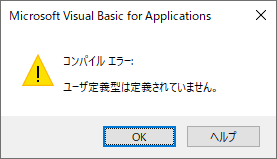
		<summary type="html"><![CDATA[<p>現象 VBAで「VBComponent」を使用しようとした際、「コンパイル エラー:ユーザ定義型は定義されていません。」と表示されたときの対処方法です。 &#160; &#160; 対処方法 次の２つの設定する必要があり [&#8230;]</p>
<p>The post <a href="https://postgresweb.com/error-when-trying-to-use-vbcomponent">【VBA】VBComponentを使おうとしたときにエラーが発生</a> first appeared on <a href="https://postgresweb.com">PostgresWeb - ポスグレウェブ</a>.</p>]]></summary>

					<content type="html" xml:base="https://postgresweb.com/error-when-trying-to-use-vbcomponent"><![CDATA[<h2>現象</h2>
<p style="margin: -15px 0px 0px 0px; line-height: 34px;"><span style="font-size: 15px;">VBAで「VBComponent」を使用しようとした際、「コンパイル エラー:ユーザ定義型は定義されていません。」と表示されたときの対処方法です。</span></p>
<p><img loading="lazy" class="alignnone size-full wp-image-14894" src="https://postgresweb.com/wp-content/uploads/2023/12/Error-when-trying-to-use-VBComponent01.png" alt="" width="277" height="159" /></p>
<p>&nbsp;</p>
<p>&nbsp;</p>
<h2>対処方法</h2>
<p style="margin: -15px 0px 0px 0px; line-height: 34px;"><span style="font-size: 15px;">次の２つの設定する必要があります。</span></p>
<p>&nbsp;</p>
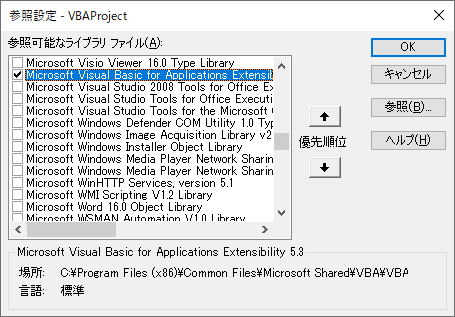
<h3>①「Microsoft Visual Basic for Applications Extensibility x.x」を追加</h3>
<p style="margin: -15px 0px 0px 0px; line-height: 34px;"><span style="font-size: 15px;">ツール＞参照設定＞「Microsoft Visual Basic for Applications Extensibility x.x」を追加</span></p>
<p style="margin: 0px; line-height: 34px;"><img loading="lazy" class="alignnone wp-image-14899 size-full" src="https://postgresweb.com/wp-content/uploads/2023/12/Error-when-trying-to-use-VBComponent03.png" alt="" width="455" height="317" srcset="https://postgresweb.com/wp-content/uploads/2023/12/Error-when-trying-to-use-VBComponent03.png 455w, https://postgresweb.com/wp-content/uploads/2023/12/Error-when-trying-to-use-VBComponent03-300x209.png 300w" sizes="(max-width: 455px) 100vw, 455px" /></p>
<p>&nbsp;</p>
<p>&nbsp;</p>
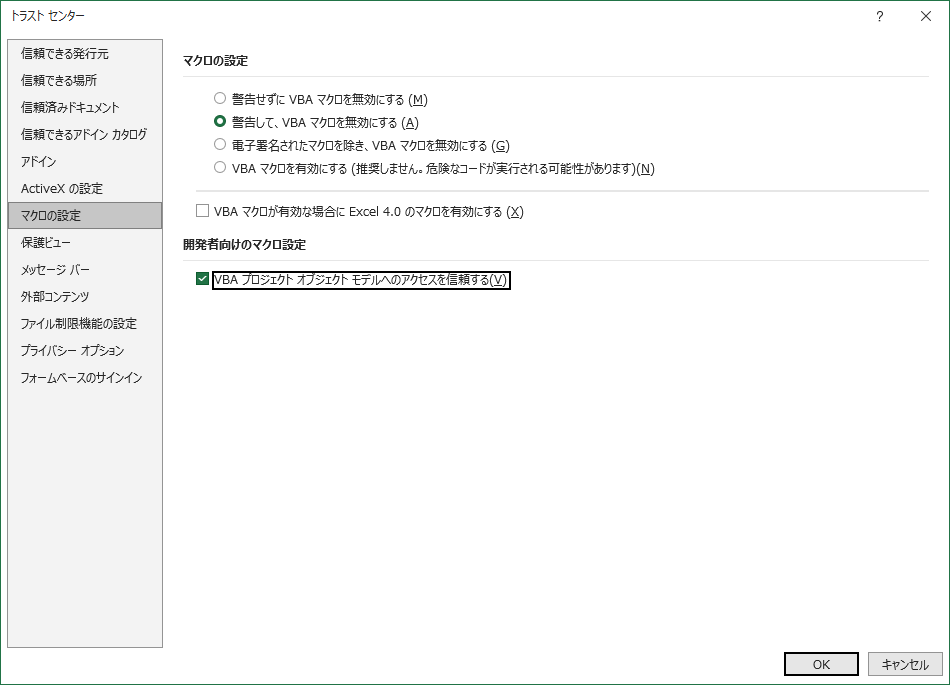
<h3>②VBAプロジェクトオブジェクトモデルへのアクセスを信頼するにチェックON</h3>
<p style="margin: -15px 0px 0px 0px; line-height: 34px;"><span style="font-size: 15px;">EXCELのメニュー＞開発＞マクロの設定＞VBAプロジェクトオブジェクトモデルへのアクセスを信頼するにチェックON</span></p>
<p style="margin: 0px; line-height: 34px;"><img loading="lazy" class="alignnone wp-image-14896" src="https://postgresweb.com/wp-content/uploads/2023/12/Error-when-trying-to-use-VBComponent02.png" alt="" width="600" height="433" srcset="https://postgresweb.com/wp-content/uploads/2023/12/Error-when-trying-to-use-VBComponent02.png 950w, https://postgresweb.com/wp-content/uploads/2023/12/Error-when-trying-to-use-VBComponent02-300x216.png 300w, https://postgresweb.com/wp-content/uploads/2023/12/Error-when-trying-to-use-VBComponent02-768x554.png 768w, https://postgresweb.com/wp-content/uploads/2023/12/Error-when-trying-to-use-VBComponent02-530x382.png 530w, https://postgresweb.com/wp-content/uploads/2023/12/Error-when-trying-to-use-VBComponent02-565x407.png 565w, https://postgresweb.com/wp-content/uploads/2023/12/Error-when-trying-to-use-VBComponent02-710x512.png 710w, https://postgresweb.com/wp-content/uploads/2023/12/Error-when-trying-to-use-VBComponent02-725x523.png 725w" sizes="(max-width: 600px) 100vw, 600px" /></p>
<p style="margin: -15px 0px 0px 0px; line-height: 34px;"> </p>
<p>&nbsp;</p>
<p style="margin: 0px; line-height: 34px;"><span style="font-size: 15px;">これでできると思いますので、試してみて下さい。</span></p><p>The post <a href="https://postgresweb.com/error-when-trying-to-use-vbcomponent">【VBA】VBComponentを使おうとしたときにエラーが発生</a> first appeared on <a href="https://postgresweb.com">PostgresWeb - ポスグレウェブ</a>.</p>]]></content>
		
			</entry>
		<entry>
		<author>
			<name>tatsuki</name>
					</author>

		<title type="html"><![CDATA[【VBA】Variant型のデメリット]]></title>
		<link rel="alternate" type="text/html" href="https://postgresweb.com/disadvantages-of-variant-type" />

		<id>https://postgresweb.com/?p=14883</id>
		<updated>2023-12-07T13:16:31Z</updated>
		<published>2023-12-07T13:15:58Z</published>
		<category scheme="https://postgresweb.com" term="VBA" />
		<summary type="html"><![CDATA[<p>行間調整 Variantは非常に柔軟な型で、どんな種類のデータも格納できるため変数を宣言するのにとても便利です。「なんでもかんでもVariantを使えばいいじゃん！」と思いますが、Variantにもいくつかデメリットがあ [&#8230;]</p>
<p>The post <a href="https://postgresweb.com/disadvantages-of-variant-type">【VBA】Variant型のデメリット</a> first appeared on <a href="https://postgresweb.com">PostgresWeb - ポスグレウェブ</a>.</p>]]></summary>

					<content type="html" xml:base="https://postgresweb.com/disadvantages-of-variant-type"><![CDATA[<h2>行間調整</h2>
<p style="margin: -15px 0px 0px 0px; line-height: 34px;"><span style="font-size: 15px;">Variantは非常に柔軟な型で、どんな種類のデータも格納できるため変数を宣言するのにとても便利です。「なんでもかんでもVariantを使えばいいじゃん！」と思いますが、Variantにもいくつかデメリットがあります。</span></p>
<p>&nbsp;</p>
<h3>①コードの可読性の低下</h3>
<p style="margin: -15px 0px 0px 0px; line-height: 34px;"><span style="font-size: 15px;">変数は、他の開発者や自分自身にとって理解しやすい形であることが重要ですが、型を指定しないとその変数がどのようなデータを期待しているのかが不明確になり、可読性が低下する可能性があります。</span></p>
<p style="margin: 0px; line-height: 34px;">&nbsp;</p>
<h3>②メモリ使用量の増加</h3>
<p style="margin: -15px 0px 0px 0px; line-height: 34px;"><span style="font-size: 15px;">Variantはオーバーヘッドがあるため、他の特定のデータ型よりもメモリ使用量が多くなり、実行速度が低下する可能性があります。</span></p>
<p style="margin: 0px; line-height: 34px;">&nbsp;</p>
<h3>③実行時エラーのリスク</h3>
<p style="margin: -15px 0px 0px 0px; line-height: 34px;"><span style="font-size: 15px;">Variantは実行時に型変換が行われるため、型が一致しない場合に実行時エラーが発生する可能性があります。型を厳密に指定することで、コンパイル時にエラーを検出することができ、安全性が向上します。</span></p>
<p style="margin: 0px; line-height: 34px;"><span style="font-size: 15px;">デメリットを踏まえて、できるだけ具体的なデータ型を選択して変数を宣言することが、コードの安全性、可読性、およびパフォーマンス向上につながると思います。</span></p><p>The post <a href="https://postgresweb.com/disadvantages-of-variant-type">【VBA】Variant型のデメリット</a> first appeared on <a href="https://postgresweb.com">PostgresWeb - ポスグレウェブ</a>.</p>]]></content>
		
			</entry>
		<entry>
		<author>
			<name>tatsuki</name>
					</author>

		<title type="html"><![CDATA[【VBA】２次元配列の指定した行に1次元配列を挿入する]]></title>
		<link rel="alternate" type="text/html" href="https://postgresweb.com/vba-inserts-a-1d-array-into-the-specified-row-of-a-2d-array" />

		<id>https://postgresweb.com/?p=14876</id>
		<updated>2023-12-06T13:20:19Z</updated>
		<published>2023-12-06T13:17:21Z</published>
		<category scheme="https://postgresweb.com" term="VBA" />
		<summary type="html"><![CDATA[<p>２次元配列の指定した行に1次元配列を挿入する VBAで、2次元配列の指定した行に1次元配列を入れるサンプルプログラムです。 &#160; '======================================== [&#8230;]</p>
<p>The post <a href="https://postgresweb.com/vba-inserts-a-1d-array-into-the-specified-row-of-a-2d-array">【VBA】２次元配列の指定した行に1次元配列を挿入する</a> first appeared on <a href="https://postgresweb.com">PostgresWeb - ポスグレウェブ</a>.</p>]]></summary>

					<content type="html" xml:base="https://postgresweb.com/vba-inserts-a-1d-array-into-the-specified-row-of-a-2d-array"><![CDATA[<h2>２次元配列の指定した行に1次元配列を挿入する</h2>
<p style="margin: -15px 0px 0px 0px; line-height: 34px;"><span style="font-size: 15px;">VBAで、2次元配列の指定した行に1次元配列を入れるサンプルプログラムです。</span></p>
<p style="margin: 0px; line-height: 10px;">&nbsp;</p>
<pre class="language-vbnet"><code>'=========================================================
'[概  要] ２次元配列の指定した行に1次元配列を挿入する
'[引数１] arr        : 2次元配列（この配列に挿入する）
'[引数２] rowIndex   : 挿入する行（0から始まるため注意）
'[引数３] newData    : 1次元配列（この配列を挿入する）
'[戻り値] 挿入後の配列
'[備　考]
'=========================================================
Function InsertAndShift(arr() As String, rowIndex As Integer, newData() As String) As String()

    Dim numRows As Integer
    Dim numCols As Integer
    numRows = UBound(arr, 1) + 1
    numCols = UBound(arr, 2) + 1

    ' 新しい行の追加
    Dim newArr() As String
    ReDim newArr(0 To numRows, 0 To numCols - 1)
    For i = 0 To numRows - 1
        For j = 0 To numCols - 1
            newArr(i, j) = arr(i, j)
        Next j
    Next i

    ' 指定位置以降のデータを後ろにシフト
    For i = numRows To rowIndex + 1 Step -1
        For j = 0 To numCols - 1
            newArr(i, j) = arr(i - 1, j)
        Next j
    Next i

    ' 新しいデータを挿入
    For j = 0 To numCols - 1
        newArr(rowIndex, j) = newData(j)
    Next j

    ' 結果の配列を返す
    InsertAndShift = newArr
   
End Function</code></pre>
<p style="margin: 0px; line-height: 10px;">&nbsp;</p>
<pre class="language-vbnet"><code>'上の関数のテスト実行
Sub TestInsertData()

    Dim arr() As String
    ReDim arr(0 To 1, 0 To 3)

    '2次元配列の初期値を設定
    arr(0, 0) = "a0"
    arr(0, 1) = "a1"
    arr(0, 2) = "a2"
    arr(0, 3) = "a3"
    arr(1, 0) = "b0"
    arr(1, 1) = "b1"
    arr(1, 2) = "b2"
    arr(1, 3) = "b3"
  
    '挿入するデータを定義
    Dim newData() As String
    ReDim newData(0 To 3)
    newData(0) = "c0"
    newData(1) = "c1"
    newData(2) = "c2"
    newData(3) = "c3"

    '★ここで実行
    'データを挿入してシフト
    arr = InsertAndShift(arr, 1, newData)

    'データの中身を表示する
    Dim i As Integer
    Dim j As Integer
    For i = LBound(arr, 1) To UBound(arr, 1)
        For j = LBound(arr, 2) To UBound(arr, 2)
            Debug.Print "arr(" & i & "," & j & ") = " & arr(i, j)
        Next j
    Next i
   
End Sub</code></pre><p>The post <a href="https://postgresweb.com/vba-inserts-a-1d-array-into-the-specified-row-of-a-2d-array">【VBA】２次元配列の指定した行に1次元配列を挿入する</a> first appeared on <a href="https://postgresweb.com">PostgresWeb - ポスグレウェブ</a>.</p>]]></content>
		
			</entry>
	</feed>